Securing the cloud: Expert tips for analyzing AWS CloudTrail logs
Discover effective strategies for detecting and mitigating unusual behaviors in AWS EC2 and S3, along with essential practices to ensure the robust security of your cloud infrastructure.


Table of Contents
We’re going to navigate through the Amazon Web Services (AWS) ecosystem. Our mission is to unpack the complexities of the logs EC2 and S3, two of the most used AWS services. We'll diligently go through, comprehend, analyze, and seamlessly embed CloudTrail directly into your AWS environment.
In this post, I'll walk you through the process of uncovering logs. Our goal is to offer deeper insights into AWS event logs, empowering you with the knowledge to fortify the security of your infrastructure and safeguard your data.
What is CloudTrail?
CloudTrail is an Amazon service that logs all your AWS account’s activities which includes events that happened in the AWS management web console, Command Line Interfaces (CLI), Application Programming Interface (API), and Software Development Kit (SDK).
It keeps track of everything that happens so that organizations can monitor and investigate activities, trace changes, and create a full audit trail, which is essential for maintaining a secure and well-governed AWS environment while protecting sensitive data from potential intrusions.
Put your cloud defensive skills to the test with our Sherlocks Labs:
| Nubilum 1 | Nubilum 2 |

Scenario: Our cloud administration team recently received a warning from Amazon that an EC2 instance deployed in our cloud environment is being utilized for malicious purposes. |
Scenario: A user reported an urgent issue to the helpdesk: an inability to access files within a designated S3 directory. This disruption has not only impeded critical operations but has also raised immediate security concerns. The urgency of this situation demands a security-focused approach. |
How to access the AWS CloudTrail?
CloudTrail can be accessed through the AWS management console, AWS CLI, AWS SDKs, or programmatically via the Cloudtrail API. The AWS Management Console offers a straightforward way to search, filter, and visualize CloudTrail log data.
To begin accessing CloudTrail AWS via Management Console, sign in to your AWS account > Services > Management & Governance > CloudTrail. Alternatively, you can search for "CloudTrail" in the console's search bar, and click on the CloudTrail service.
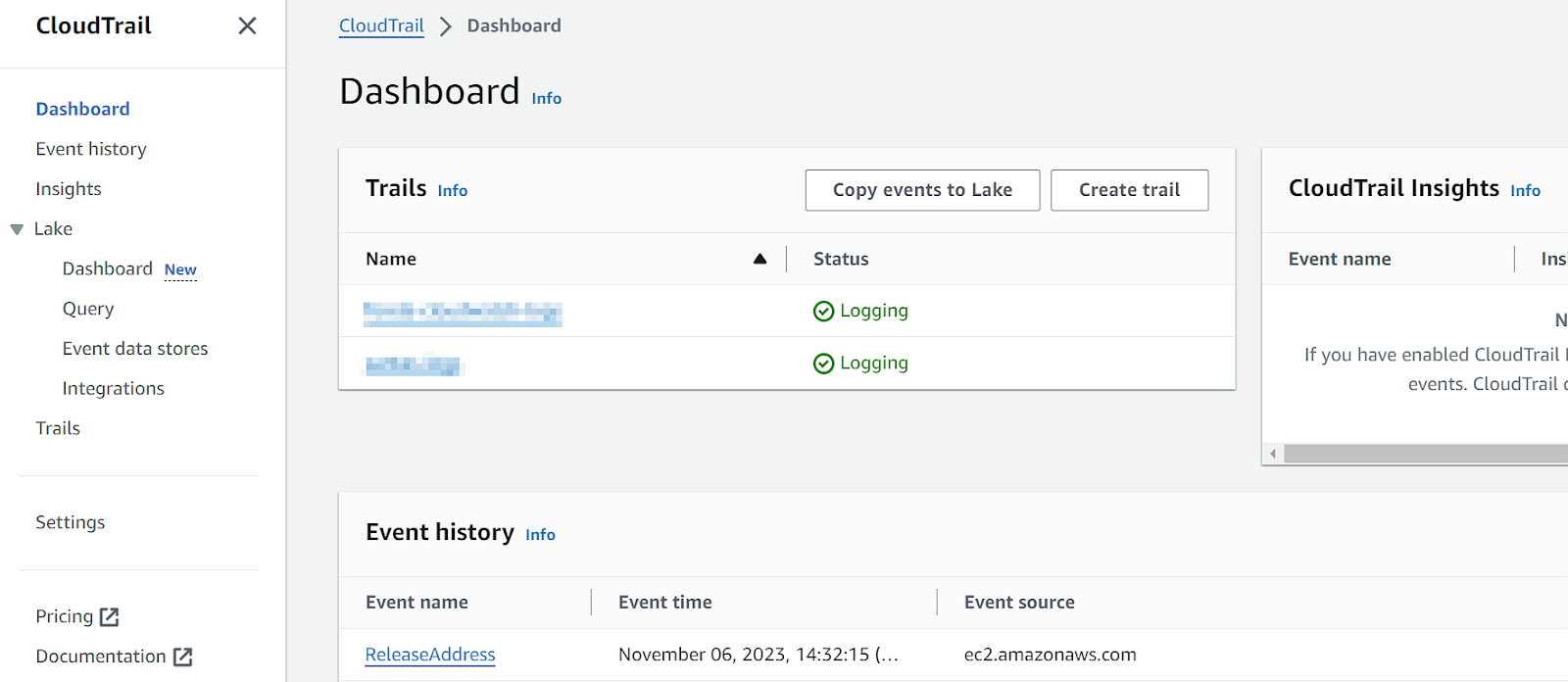
Upon entering the CloudTrail dashboard, you'll find a comprehensive overview, including the current Trails, Insights, and Event History.
Is CloudTrail enabled by default?
Yes, CloudTrail is enabled by default, and you can view the events using Event history. However, it's important to note that CloudTrail does not log events in real time; it generates log files approximately every 5 minutes.
Additionally, be mindful that the Event history retains only the most recent 90 days of management events. This implies that older events beyond this timeframe may not be accessible through CloudTrail and will be lost.
It's also noteworthy that although CloudTrail is active by default, the default settings do not include data and insight events. To capture these additional details, you must explicitly enable these events.
For a clearer understanding of the difference between these three events, refer to the table below:
|
Event type |
Management |
Data |
Insight |
|
Definition |
Management events in AWS CloudTrail capture activities related to the management of AWS resources. These events focus on actions that modify or control AWS services, such as creating EC2 instances or S3 buckets, updating security groups, or modifying IAM roles. |
Data events provide a detailed record of API actions, particularly those involving S3 objects. These events offer valuable information about the users who interacted with the data, the type of interaction (such as reading or writing), and the exact time of the interaction. To ensure thorough monitoring and auditing of S3 object-level activities, enabling data events is essential. |
Insight events in AWS CloudTrail provide enhanced visibility into AWS resource configurations, access patterns, and potential security risks. These events are designed to simplify the analysis of CloudTrail logs by automatically identifying and summarizing important events and patterns. |
|
Event examples |
RunInstances: An EC2 instance is launched. |
GetObject: A user retrieves an object from an S3 bucket. |
"eventType": "AwsCloudTrailInsight", "insightDetails": { "state": "Start", "eventSource": "signin.amazonaws.com", "eventName": "ConsoleLogin", "insightType": "ApiCallRateInsight", "insightContext": { "statistics": { "baseline": { "average": 0.0025390258 }, "insight": { "average": 6.4 }, "insightDuration": 5, "baselineDuration": 10634 }, An event is triggered when there is a notable deviation from the average baseline. |
|
TerminateInstances: An EC2 instance is terminated. |
PutObject: A new object is uploaded to an S3 bucket. |
||
|
PutBucketPolicy: A new policy is applied to an S3 bucket. |
DeleteObject: An S3 object is deleted. |
Moreover, keep in mind that CloudTrail records events in the specific AWS Region where the event occurred. If a particular event is not found in the logs, try switching to another AWS Region where the event might have transpired.
To view the Event History, select Event history from the navigation pane to view the events in the currently selected region.

CloudTrail log structure
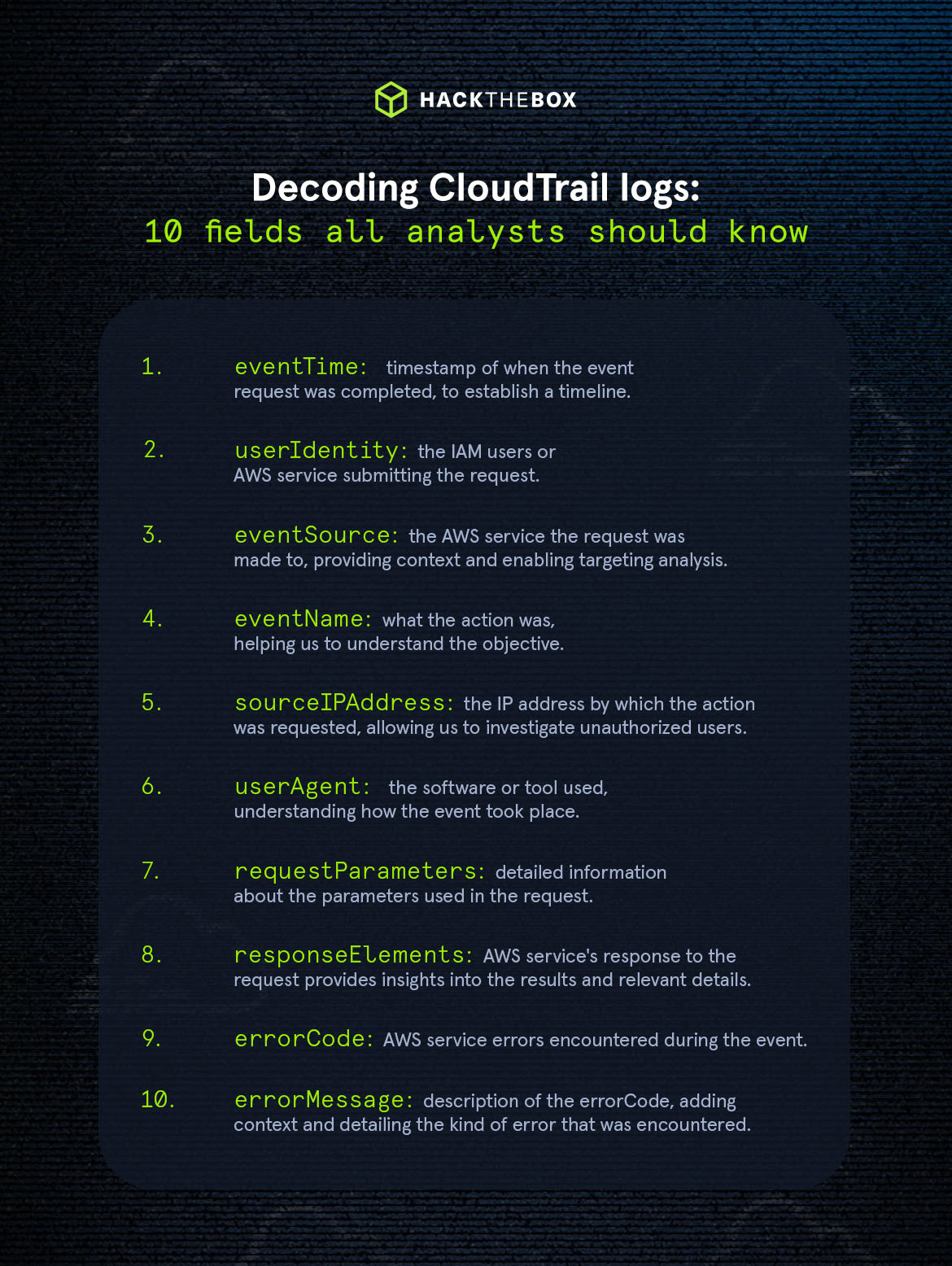
CloudTrail logs have a JSON format that includes detailed information about API calls made on the AWS account. When looking at a CloudTrail log, keep an eye on the following interesting fields:
|
Field |
Description |
Importance |
|
eventTime |
Timestamp of the event when the request was completed, formatted in UTC. |
For establishing a timeline of events. |
|
userIdentity |
The IAM user, role, or AWS service who is submitting the request. |
Information about the IAM user or AWS entity issuing the request is vital for accountability and to determine proper authorization. |
|
eventSource |
The AWS service that the request was made to. |
Identifying the specific AWS service involved gives context and enables targeted analysis and comprehension of the operation's nature. |
|
eventName |
The API call or action that was requested. |
The exact action that is being requested can give a clue about the kind of operation being performed, which can help to better understand the objective of the action. |
|
sourceIPAddress |
Indicates the IP address from which the API call originated. |
The IP address of the requester is critical for tracking the source of the request, and identifying potential unauthorized access. |
|
userAgent |
The initiating software or tool for the request, which could be an AWS Service, AWS Management Console, AWS SDK, or AWS CLI. |
The user agent information shows the software or tool used, contributing to the understanding of how communication with AWS services occurred. |
|
requestParameters |
This field contains detailed information about the parameters used in the request. |
This allows responders to examine the specific parameters associated with the API call, enabling the identification of values or resources involved. |
|
responseElements |
The AWS service's response to the request provides insights into the results and relevant details. |
Captures the output of the request when the operation is successful; otherwise, it will return an errorCode in case of an issue. |
|
errorCode |
Specific AWS service errors encountered during the event. |
It highlights the issues encountered and provides us with a quick idea of what the issue is about. |
|
errorMessage |
Description of the errorCode, adding context and detailing the kind of error that was encountered. |
Complements the errorCode by giving deeper information about the issue, helping administrators or responders to conduct a more effective investigation. |
Understanding the log structure is crucial for effective analysis and interpretation of CloudTrail data during forensic investigations. Let’s take a look at our example below:
{
    "eventVersion": "1.08",
    "userIdentity": {
        "type": "IAMUser",
        "principalId": "AIDA52GPOBQCAXKB4JMJ7",
        "arn": "arn:aws:iam::012345678910:user/charlie.brown",
        "accountId": "012345678910",
        "userName": "charlie.brown"
    },
    "eventTime": "2023-04-11T02:57:19Z",
    "eventSource": "signin.amazonaws.com",
    "eventName": "ConsoleLogin",
    "awsRegion": "ap-southeast-2",
    "sourceIPAddress": "11.22.33.44",
    "userAgent": "Mozilla/5.0 (Windows NT 10.0; Win64; x64) AppleWebKit/537.36 (KHTML, like Gecko) Chrome/119.0.0.0 Safari/537.36 Edg/119.0.0.0",
    "requestParameters": null,
    "responseElements": {
        "ConsoleLogin": "Success"
    },
    "additionalEventData": {
        "LoginTo": "https://console.aws.amazon.com/console/home?hashArgs=%23&isauthcode=true&state=hashArgsFromTB_ap-southeast-2_c02abb26e8a93195",
        "MobileVersion": "No",
        "MFAUsed": "No"
    },
    "eventID": "a2d8a421-7035-4ab2-81be-36db912717be",
    "readOnly": false,
    "eventType": "AwsConsoleSignIn",
    "managementEvent": true,
    "recipientAccountId": "012345678910",
    "eventCategory": "Management",
    "tlsDetails": {
        "tlsVersion": "TLSv1.3",
        "cipherSuite": "TLS_AES_128_GCM_SHA256",
        "clientProvidedHostHeader": "ap-southeast-2.signin.aws.amazon.com"
    }
}
Based on the log above, we can determine that the user with the account “charlie.brown” successfully logged in on April 11th, 2023, at approximately 02:57:19 UTC. The login occurred using the AWS Management Console using a web browser, with the IP address 11.22.33.44.
The example illustrates the practical value of familiarizing ourselves with CloudTrail events, as it allows us to efficiently detect and respond to any unusual activities and manage potential security incidents.
How to keep events beyond 90 days?
Creating an AWS Trail is our solution for retaining or having a copy of logs that are past the default 90-day retention period, as it will send the events to an S3 bucket. Trails play an important role in extending your log retention strategy, facilitating troubleshooting, and enabling you to maintain a record of occurrences for compliance, audit, and historical analysis.
To create a Trail, follow these steps:
-
Select "Trails" in the left pane and click the "Create Trail" button.
-
Give your Trail a name and either create a new S3 bucket or select an existing one. It's recommended to encrypt your logs using a Key Management Service (KMS) since the data being transferred is sensitive. Additionally, you can configure CloudWatch logs to monitor your Trail and notify you in case of specified activities.
-
Select the event types you want to log—whether it's management, data, or insights. You can refer back to the table above to review the differences between the three.
For more details on setting up a Trail, you can find comprehensive information on AWS' official page.
CloudTrail log analysis examples
Now, let's jump in and have some fun digging into these sample logs!
1. Unapproved EC2 instance deployment
Scenario:
An organization utilizing Amazon Web Services (AWS) experienced an unexpected and unauthorized EC2 instance launch outside of normal business hours. The CloudTrail logs revealed this security incident, prompting an immediate investigation.
{
    "eventVersion": "1.08",
    "userIdentity": {
        "type": "IAMUser",
        "principalId": "AIDABC123ABC123ABC123",
        "arn": "arn:aws:iam::012345678910:user/testaccount",
        "accountId": "012345678910",
        "accessKeyId": "AKIABC123ABC123ABC123",
        "userName": "testaccount",
        "sessionContext": {
            "sessionIssuer": {},
            "webIdFederationData": {},
            "attributes": {
                "creationDate": "2023-05-24T18:49:01Z",
                "mfaAuthenticated": "false"
            }
        }
    },
    "eventTime": "2023-05-24T18:51:25Z",
    "eventSource": "ec2.amazonaws.com",
    "eventName": "RunInstances",
    "awsRegion": "eu-north-1",
    "sourceIPAddress": "98.76.54.32",
    "userAgent": "AWS Internal",
    "requestParameters": {
        "instancesSet": {
            "items": [
                {
                    "imageId": "ami-0fc5d935ebf8bc3bc",
                    "minCount": 1,
                    "maxCount": 1,
                    "keyName": "keyPair1"
                }
            ]
        },
        "instanceType": "c7a.48xlarge",
        "blockDeviceMapping": {
            "items": [
                {
                    "deviceName": "/dev/sda1",
                    "ebs": {
                        "snapshotId": "snap-0fe62e94bc2ecc9d5",
                        "volumeSize": 8192,
                        "deleteOnTermination": true,
                        "volumeType": "gp3",
                        "iops": 3000,
                        "encrypted": false,
                        "throughput": 125
                    }
                }
            ]
        },
        "monitoring": {
            "enabled": false
        },
        "disableApiTermination": false,
        "disableApiStop": false,
        "clientToken": "5aeb67db-63c0-4768-a109-7e61b3b05966",
        "networkInterfaceSet": {
            "items": [
                {
                    "deviceIndex": 0,
                    "subnetId": "subnet-06b4b5bc0a0ecca33",
                    "associatePublicIpAddress": true,
                    "groupSet": {
                        "items": [
                            {
                                "groupId": "sg-082eb78cec3a15c91"
                            }
                        ]
                    }
                }
            ]
        },
        "ebsOptimized": true,
        "tagSpecificationSet": {
            "items": [
                {
                    "resourceType": "instance",
                    "tags": [
                        {
                            "key": "Name",
                            "value": "prod-server"
                        }
                    ]
                }
            ]
        },
        "metadataOptions": {
            "httpTokens": "required",
            "httpPutResponseHopLimit": 2,
            "httpEndpoint": "enabled"
        },
        "privateDnsNameOptions": {
            "hostnameType": "ip-name",
            "enableResourceNameDnsARecord": false,
            "enableResourceNameDnsAAAARecord": false
        }
    },
    "responseElements": {
        "requestId": "2d42f697-341f-4741-8a51-e528e4a1aef9",
        "reservationId": "r-079e466e68869914a",
        "ownerId": "012345678910",
        "groupSet": {},
        "instancesSet": {
            "items": [
                {
                    "instanceId": "i-0705171eb7239568e",
                    "imageId": "ami-0fc5d935ebf8bc3bc",
                    "currentInstanceBootMode": "legacy-bios",
                    "instanceState": {
                        "code": 0,
                        "name": "pending"
                    },
                    "privateDnsName": "ip-192-168-0-9.ec2.internal",
                    "keyName": "keyPair1",
                    "amiLaunchIndex": 0,
                    "productCodes": {},
                    "instanceType": "c7a.48xlarge",
                    "launchTime": 1701240684000,
                    "placement": {
                        "availabilityZone": "eu-north-1a",
                        "tenancy": "default"
                    },
                    "monitoring": {
                        "state": "disabled"
                    },
                    "subnetId": "subnet-06b4b5bc0a0ecca33",
                    "vpcId": "vpc-0f97b19654604cc18",
                    "privateIpAddress": "192.168.0.9",
                    "stateReason": {
                        "code": "pending",
                        "message": "pending"
                    },
                    "architecture": "x86_64",
                    "rootDeviceType": "ebs",
                    "rootDeviceName": "/dev/sda1",
                    "blockDeviceMapping": {},
                    "virtualizationType": "hvm",
                    "hypervisor": "xen",
                    "tagSet": {
                        "items": [
                            {
                                "key": "Name",
                                "value": "prod-server"
                            }
                        ]
                    },
                    "clientToken": "5aeb67db-63c0-4768-a109-7e61b3b05966",
                    "groupSet": {
                        "items": [
                            {
                                "groupId": "sg-082eb78cec3a15c91",
                                "groupName": "default"
                            }
                        ]
                    },
                    "sourceDestCheck": true,
                    "networkInterfaceSet": {
                        "items": [
                            {
                                "networkInterfaceId": "eni-083413ea4cfd59843",
                                "subnetId": "subnet-06b4b5bc0a0ecca33",
                                "vpcId": "vpc-0f97b19654604cc18",
                                "ownerId": "012345678910",
                                "status": "in-use",
                                "macAddress": "0e:d8:ce:d9:3b:25",
                                "privateIpAddress": "192.168.0.9",
                                "privateDnsName": "ip-192-168-0-9.ec2.internal",
                                "sourceDestCheck": true,
                                "interfaceType": "interface",
                                "groupSet": {
                                    "items": [
                                        {
                                            "groupId": "sg-082eb78cec3a15c91",
                                            "groupName": "default"
                                        }
                                    ]
                                },
                                "attachment": {
                                    "attachmentId": "eni-attach-099a4e91bc22870db",
                                    "deviceIndex": 0,
                                    "networkCardIndex": 0,
                                    "status": "attaching",
                                    "attachTime": 1684911084000,
                                    "deleteOnTermination": true
                                },
                                "privateIpAddressesSet": {
                                    "item": [
                                        {
                                            "privateIpAddress": "192.168.0.9",
                                            "privateDnsName": "ip-192-168-0-9.ec2.internal",
                                            "primary": true
                                        }
                                    ]
                                },
                                "ipv6AddressesSet": {},
                                "tagSet": {}
                            }
                        ]
                    },
                    "ebsOptimized": true,
                    "enaSupport": true,
                    "cpuOptions": {
                        "coreCount": 1,
                        "threadsPerCore": 2
                    },
                    "capacityReservationSpecification": {
                        "capacityReservationPreference": "open"
                    },
                    "enclaveOptions": {
                        "enabled": false
                    },
                    "metadataOptions": {
                        "state": "pending",
                        "httpTokens": "required",
                        "httpPutResponseHopLimit": 2,
                        "httpEndpoint": "enabled",
                        "httpProtocolIpv4": "enabled",
                        "httpProtocolIpv6": "disabled",
                        "instanceMetadataTags": "disabled"
                    },
                    "maintenanceOptions": {
                        "autoRecovery": "default"
                    },
                    "privateDnsNameOptions": {
                        "hostnameType": "ip-name",
                        "enableResourceNameDnsARecord": false,
                        "enableResourceNameDnsAAAARecord": false
                    }
                }
            ]
        }
    },
    "requestID": "2d42f697-341f-4741-8a51-e528e4a1aef9",
    "eventID": "5a4fa254-3644-4407-a0d4-060a60a7422d",
    "readOnly": false,
    "eventType": "AwsApiCall",
    "managementEvent": true,
    "recipientAccountId": "012345678910",
    "eventCategory": "Management",
    "sessionCredentialFromConsole": "true"
}
Questions:
-
Which security group was associated with the newly launched EC2 instance?
-
What kind of server was created?
Analysis:
To find out which security group is linked to the recently launched EC2 instance, we should check the "responseElements" section. This part contains details about the created instance, including the group's ID and Name. By examining these details, you can pinpoint the specific security group associated with the instance.
For the second question regarding the type of server created, inspect the "requestParameters" field in the CloudTrail log, which contains details about the requested resources. Let’s then pay attention to the "instanceType" value, indicating the type of EC2 instance launched. You can also check the "imageId" field to identify the Amazon Machine Image (AMI) used for creating the instance.
Answers:
-
default
-
c7a.48xlarge
2. Unauthorized bucket configuration changes
Scenario:
An AWS account owner notices unexpected alterations to the configurations of an S3 bucket. The bucket, initially set to private access, has been modified to allow public access. This unauthorized change raises concerns about data security and compliance.
{
    "eventVersion": "1.09",
    "userIdentity": {
        "type": "IAMUser",
        "principalId": "AIDABC123ABC123ABC123",
        "arn": "arn:aws:iam::012345678910:user/I4mUser",
        "accountId": "012345678910",
        "accessKeyId": "AKIABC123ABC123ABC123",
        "userName": "I4mUser",
        "sessionContext": {
            "attributes": {
                "creationDate": "2023-01-02T06:49:01Z",
                "mfaAuthenticated": "false"
            }
        }
    },
    "eventTime": "2023-01-02T07:26:47Z",
    "eventSource": "s3.amazonaws.com",
    "eventName": "PutBucketPolicy",
    "awsRegion": "us-west-2",
    "sourceIPAddress": "34.12.56.78",
    "userAgent": "[S3Console/0.4, aws-internal/3 aws-sdk-java/1.12.488 Linux/5.10.198-165.748.amzn2int.x86_64 OpenJDK_64-Bit_Server_VM/25.372-b08 java/1.8.0_372 vendor/Oracle_Corporation cfg/retry-mode/standard]",
    "requestParameters": {
        "bucketPolicy": {
            "Version": "2012-10-17",
            "Statement": [
                {
                    "Sid": "PublicReadGetObject",
                    "Effect": "Allow",
                    "Principal": "*",
                    "Action": [
                        "s3:GetObject"
                    ],
                    "Resource": [
                        "arn:aws:s3:::secret-bucket/*"
                    ]
                }
            ]
        },
        "bucketName": "secret-bucket",
        "Host": "s3.amazonaws.com",
        "policy": ""
    },
    "responseElements": null,
    "additionalEventData": {
        "SignatureVersion": "SigV4",
        "CipherSuite": "ECDHE-RSA-AES128-GCM-SHA256",
        "bytesTransferredIn": 349,
        "AuthenticationMethod": "AuthHeader",
        "x-amz-id-2": "LosKyYHy7c23S31ShGCVVyUA2MUeaENMAHoRmv6IITHCSxG6gKnEQZO7mhKQKOqd8mfGCSiO0E0=",
        "bytesTransferredOut": 0
    },
    "requestID": "E53WA2ETV5MG3CV7",
    "eventID": "5b256c0b-cfb7-4a98-bfe9-c99acd84a5ad",
    "readOnly": false,
    "resources": [
        {
            "accountId": "012345678910",
            "type": "AWS::S3::Bucket",
            "ARN": "arn:aws:s3:::secret-bucket"
        }
    ],
    "eventType": "AwsApiCall",
    "managementEvent": true,
    "recipientAccountId": "012345678910",
    "vpcEndpointId": "vpce-f40dc59d",
    "eventCategory": "Management",
    "tlsDetails": {
        "tlsVersion": "TLSv1.2",
        "cipherSuite": "ECDHE-RSA-AES128-GCM-SHA256",
        "clientProvidedHostHeader": "s3.amazonaws.com"
    }
}
Questions:
-
Identify the user account responsible for modifying the S3 bucket.
-
Which S3 bucket was affected?
Analysis:
To discover who made the changes to the S3 bucket, examine the "userIdentity" section and focus on the "userName" field. This field contains the IAM account linked to the modification, which can help you pinpoint the individual or entity responsible for the changes made to the bucket.
Following that, to determine the bucket impacted by the unauthorized modifications, we can take a look at the "resources" section in the CloudTrail log or the "requestParameters" section. There, we'll find the “bucketName” that has been singled out for alteration.
Answers:
-
I4mUser
-
secret-bucket
3. Unusual S3 object activity
A cybersecurity incident unfolded within a corporate AWS environment involving an unusual S3 object download. The incident raised concerns about potential data exfiltration and prompted a swift response from the security team.
An AWS CloudTrail log captured an unexpected S3 “GetObject” event within the corporate AWS environment. The incident, initiated by an IAM user, involved the retrieval of a specific S3 object from a designated bucket. While the event itself appeared legitimate, certain characteristics raised concerns, prompting a thorough investigation.
{
  "eventVersion": "1.09",
  "userIdentity": {
    "type": "IAMUser",
    "principalId": "AIDABC123ABC123ABC123",
    "arn": "arn:aws:iam::012345678910:user/hr-isabella.davis",
    "accountId": "012345678910",
    "accessKeyId": "AKIABC123ABC123ABC123",
    "userName": "hr-isabella.davis"
  },
  "eventTime": "2023-08-10T15:25:39Z",
  "eventSource": "s3.amazonaws.com",
  "eventName": "GetObject",
  "awsRegion": "us-east-1",
  "sourceIPAddress": "12.34.56.78",
  "userAgent": "[aws-cli/2.12.0 Python/3.11.4 Linux/5.11.0-27-generic source/x86_64.ubuntu.20.04 prompt/off command/s3.cp]"
  "requestParameters": {
    "bucketName": "private-data",
    "Host": "private-data.s3.us-east-1.amazonaws.com",
    "key": "documents/orgReport.pdf"
  },
  "responseElements": null,
  "additionalEventData": {
    "SignatureVersion": "SigV4",
    "CipherSuite": "ECDHE-RSA-AES128-GCM-SHA256",
    "bytesTransferredIn": 0,
    "AuthenticationMethod": "AuthHeader",
    "x-amz-id-2": "J7vZCNYUnuRNNIPDJLShdXiXIADgqE10y88gIChEkjekGK7ZogFgxM46H91GqGzuOWSWe/ivhzQ=",
    "bytesTransferredOut": 1500000
  },
  "requestID": "PMAW548SHGSN4MNV",
  "eventID": "77eaea22-8bb7-4aa2-bc92-82df8fd73873",
  "readOnly": true,
  "resources": [
    {
      "type": "AWS::S3::Object",
      "ARN": "arn:aws:s3:::private-data/documents/orgReport.pdf"
    },
    {
      "accountId": "012345678910",
      "type": "AWS::S3::Bucket",
      "ARN": "arn:aws:s3:::private-data"
    }
  ],
  "eventType": "AwsApiCall",
  "managementEvent": false,
  "recipientAccountId": "012345678910",
  "eventCategory": "Data",
  "tlsDetails": {
    "tlsVersion": "TLSv1.2",
    "cipherSuite": "ECDHE-RSA-AES128-GCM-SHA256",
    "clientProvidedHostHeader": "private-data.s3.us-east-1.amazonaws.com"
  }
}
Questions:
-
What tool facilitated the file download?
-
What is the volume of data transferred out of the S3 bucket?
Analysis:
The key to figuring out which tool was used for the download lies in the "userAgent" field. This field provides important information about the client or application that initiated the file retrieval.
Turning to the second question about the data transfer, our focus should be on the "additionalEventData" section. This section contains significant details like the amount of data transferred in and out.
Answers:
-
AWS CLI
-
1500000
Proficiency unlocked: Navigating AWS CloudTrail logs
Congratulations! You’ve successfully gained new skills in administering, comprehending, and analyzing AWS CloudTrail logs–a valuable skill set that's pivotal for ensuring the security of your cloud infrastructure.
As we've explored the complexities of log structures through our sample cases, you're now equipped to reconstruct events, identify irregularities, and promptly address potential security threats.
Your commitment to enhancing your knowledge for a more secure cloud infrastructure is truly admirable and aligns perfectly with the essential skill set required for positions such as SOC and cybersecurity analysts.
But, hold on tight because there's an exciting next step!
It’s time to level up!
Become a job-ready SOC analyst
-
Learn core security monitoring and security analysis concepts. You’ll gain a deep understanding of tools, attack tactics, and methodologies used by cybercriminals.
-
Practice with hands-on exercises. Put theory into practice with plenty of exercises to push your knowledge to its limits!
-
Leave with the right mindset. Becoming a SOC analyst is about the mindset, you’ll learn how to think like a hacker so you can defend against them.
Ready to supercharge your skills even further? Take the leap and sign up for HTB Labs to experience the thrill of learning with our virtual lab environments. It offers a realistic setting where you can apply your knowledge and skills. Whether you're a beginner or a seasoned professional, a blue or a red teamer, our labs offer a dynamic space to elevate your skills.
It's your golden ticket to unlocking a whole new level of expertise and embarking on an incredible learning adventure!
|
Author bio: Mark Ignacio (n4ch0), Defensive Content Engineer, Hack The Box Mark is a seasoned IT professional with more than 13 years of experience, specializes in managing server infrastructure across a variety of platforms in physical and virtual environments, both on-premise and in the cloud. His tenure at Trustwave SpiderLabs provided him with the opportunity to establish a realistic setting for incident response training, igniting his passion for creating engaging settings for learning and enjoyment. Throughout his career, he has developed a deep interest in cybersecurity, with a focus on digital forensics and incident response. His relentless pursuit of staying current with the constantly evolving cybersecurity landscape demonstrates his commitment to continuous growth and expertise. You can connect with him on LinkedIn here. |